:no_upscale())
Pourquoi 4 géants de la grande distribution sont poursuivis en justice
Lire l'histoire

We see colours thanks to three types of cones in the retina. Each type reacts to a different range of light: red, green or blue. If one type of cone works less well or not at all, people perceive certain colours differently.
Strictly speaking, there are two forms:
Colour vision deficiency: People can see all colours, but perceive some of them more weakly. Red and green, for example, look very similar.
Colour blindness: People cannot perceive one or more colours at all. In complete colour blindness, called achromatopsia, people see only shades of grey.
In everyday language, "colour blindness" is often used for both. Most people affected have a colour vision deficiency, not complete colour blindness.
Red-green deficiency: by far the most common form. Red and green are hard to tell apart. Depending on which cone is affected, it is called protanomaly or protanopia (red) and deuteranomaly or deuteranopia (green).
Blue-yellow deficiency (tritanomaly or tritanopia): rare. Blue and green, and yellow and pink, are hard to tell apart.
Complete colour blindness (achromatopsia): very rare. People affected see only light and dark, and are often very sensitive to glare.
 Figure 1: Simulation of different colour blindnesses. Original (top left), red blindness (top right), green blindness (bottom left) and blue blindness (bottom right).
According to the German Federal Ministry of Health's portal gesund.bund.de, around 8% of men and 0.4% of women have a colour vision deficiency. In a team of 25 men, statistically two are affected. Complete colour blindness, on the other hand, is very rare: in Germany, only around 2,700 people live with it.
Men are affected much more often because the genes for red and green cones are on the X chromosome. Men have only one X chromosome, so a change in this gene has a direct effect. Women have two and are usually carriers without symptoms.
Colour vision can also change over the course of life, for example due to eye diseases. In addition, many people see colours less clearly in certain situations, such as on a phone in bright sunlight.
Colour blindness becomes a barrier when colour is the only way to convey information. Typical examples:
Links in running text: If links are only marked by colour, without underlining, many people cannot see them.
Error and success messages: A red frame around a form field or a green tick alone is not enough.
Charts and maps: Lines, bars or areas that differ only in colour cannot be told apart.
Status displays: Red, amber and green indicators, such as for availability or delivery status, become unclear.
Buttons and selections: If the active state is only shown by a colour change, users do not know what is selected.
Low contrast: Light grey text on a white background or text over images is hard to read – not only for people with a colour vision deficiency.
Placeholders in forms: Light grey placeholder text is often hard to tell apart from text that has already been entered.
The problem is widespread. According to the WebAIM Million 2026, 83.9% of the home pages of the top one million websites had text with too little contrast.
Figure 2 shows how a chart can look to someone with green blindness:
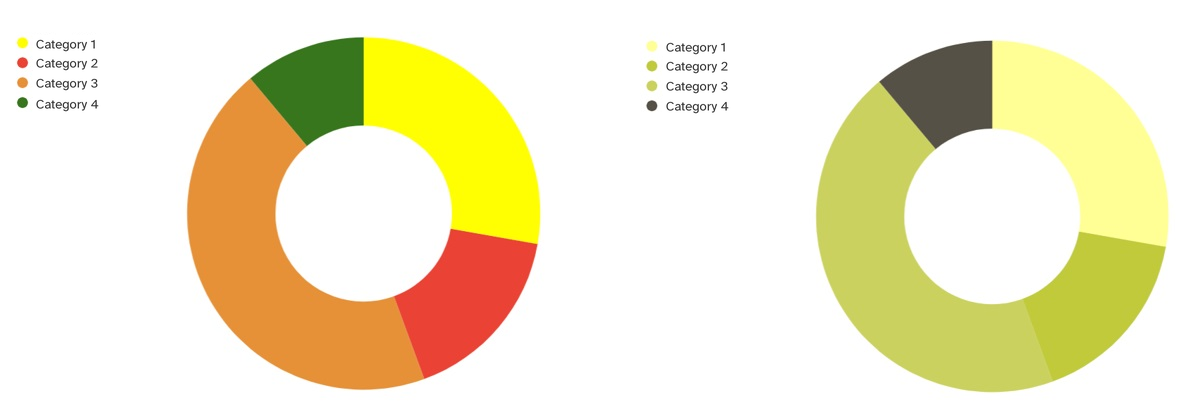 Figure 2: On the left the unchanged diagram, on the right with simulated green blindness.
The Web Content Accessibility Guidelines (WCAG) contain three success criteria that are especially important for colour:
1.4.1 Use of Colour (level A): Colour must not be the only visual means of conveying information, indicating an action or distinguishing an element.
1.4.3 Contrast (Minimum) (level AA): Text needs a contrast ratio of at least 4.5:1 to its background, large text at least 3:1.
1.4.11 Non-text Contrast (level AA): Buttons, form field borders, focus indicators and important graphics need a contrast ratio of at least 3:1.
These criteria are part of the European standard EN 301 549, on which the European Accessibility Act is based.
Never use colour alone: Combine colour with text, icons, patterns or underlining. An error message needs a clear text, not just a red frame.
Underline links: Links in running text should be underlined or otherwise visibly marked.
Check contrast: Use a contrast checker to make sure text and important elements meet the WCAG values.
Label charts directly: Write labels next to lines and bars instead of using a colour legend only. Patterns or different line styles help too.
Avoid critical colour combinations: Red and green, green and brown, and blue and purple are hard to tell apart for many people.
Test with a simulation: Many design tools and browser developer tools can simulate different colour vision deficiencies. This shows quickly where information gets lost.
Think beyond colour blindness: Good contrast and clear signals also help older people, people with low vision and anyone using a phone outdoors.
Our guide to accessible design with WCAG and our article on accessible online forms contain more practical tips.
Accessible design is the foundation. In addition, Eye-Able Assist lets visitors adjust a website to their own needs. A special mode adjusts colours for people with colour blindness or a colour vision deficiency, and the contrast mode makes text easier to read.
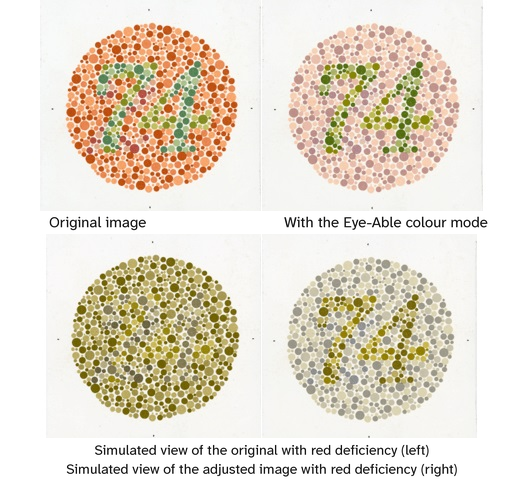 Figure 3: Illustration of colour correction using Ishihara test images (Source: Wellcome collection CC BY 4.0)
Figure 3 shows how the colour mode can make differences visible again in Ishihara test images. Increasing the contrast or colour saturation can also help. The traffic light in Figure 4 is another example:
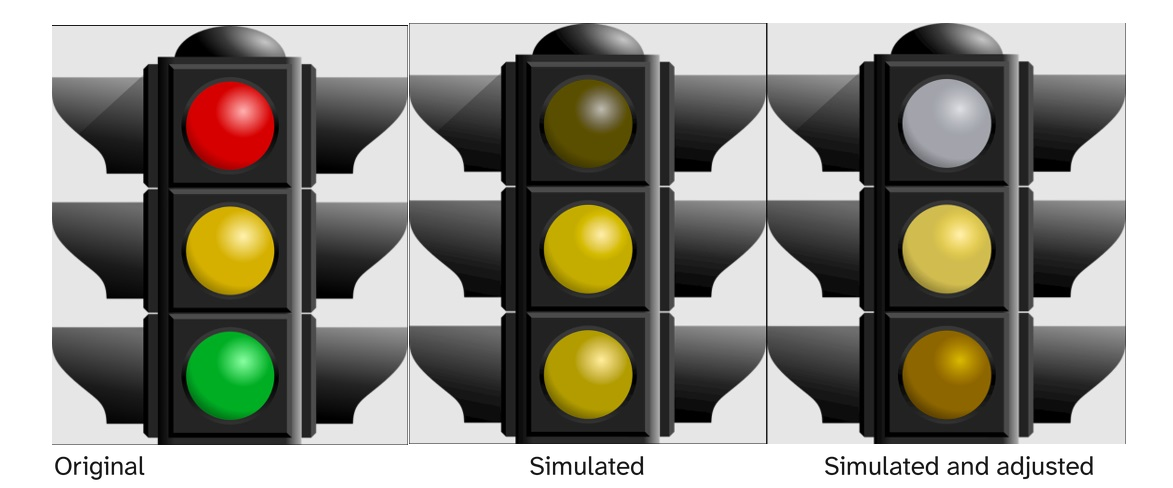 Figure 4: Traffic light with normal colours (left), traffic light for people with red deficiency (middle), traffic light for people with red deficiency after the Eye-Able correction (right)
Assist does not replace accessible design, though. Whether a website meets the WCAG contrast requirements depends on its design and implementation. With Eye-Able Audit & Report, you can check your website for contrast errors and other barriers and fix them at the source.
Around one in twelve men has a colour vision deficiency. For them, information that is conveyed only by colour gets lost. The solution is simple: never use colour alone, ensure sufficient contrast and test your design with a simulation. This makes websites easier to use for everyone.
Curious how accessible your own website is? Our free accessibility check gives you a first overview in less than 2 minutes.
Around 8% of men and 0.4% of women have a colour vision deficiency. The most common form is red-green deficiency. Complete colour blindness, in which people see only shades of grey, is very rare.
People with a colour vision deficiency see all colours, but some of them more weakly. People with colour blindness cannot perceive one or more colours at all. In everyday language, "colour blindness" is often used for both.
Avoid combinations of red and green, green and brown, and blue and purple when they are meant to convey a difference. Most importantly, never use colour as the only signal – always add text, icons or patterns.
WCAG success criterion 1.4.1 says that colour must not be the only means of conveying information. In addition, text needs a contrast ratio of at least 4.5:1 (1.4.3), and buttons, form fields and important graphics need at least 3:1 (1.4.11).
Use the colour vision deficiency simulation in your design tool or browser developer tools to see your website as people with different types of colour blindness see it. A contrast checker or an automated accessibility check shows contrast errors.
Pourquoi 4 géants de la grande distribution sont poursuivis en justice
Lire l'histoireContactez-nous et nous serons ravis de vous aider.
:no_upscale():format(png))
:no_upscale():format(png))